Customer Portal Footer & Trust Signals Update
As part of our continuous effort to provide enterprise-grade security and a seamless white-label experience, we are rolling out a new structural update to the borrower-facing login screen. We are adding a pre-login footer that prominently features your institution's specific utility links: Contact Us, Terms & Conditions, Privacy Policy, Company page, and a newly added FAQ page. We are also introducing a subtle "Powered by LoanPro" vendor declaration.
Recently, automated security scanners (like Google Safe Browsing) have become highly aggressive in flagging white-labeled login pages as potential phishing threats. By surfacing your corporate links on the unauthenticated login screen, we are feeding these algorithms powerful "Trust Signals." It mathematically proves to scanners that this page is a legitimate extension of your corporate architecture. Furthermore, the "Powered by LoanPro" text satisfies vendor declaration requirements, explaining to both human reviewers and AI why a third-party software provider is securely hosting your portal.
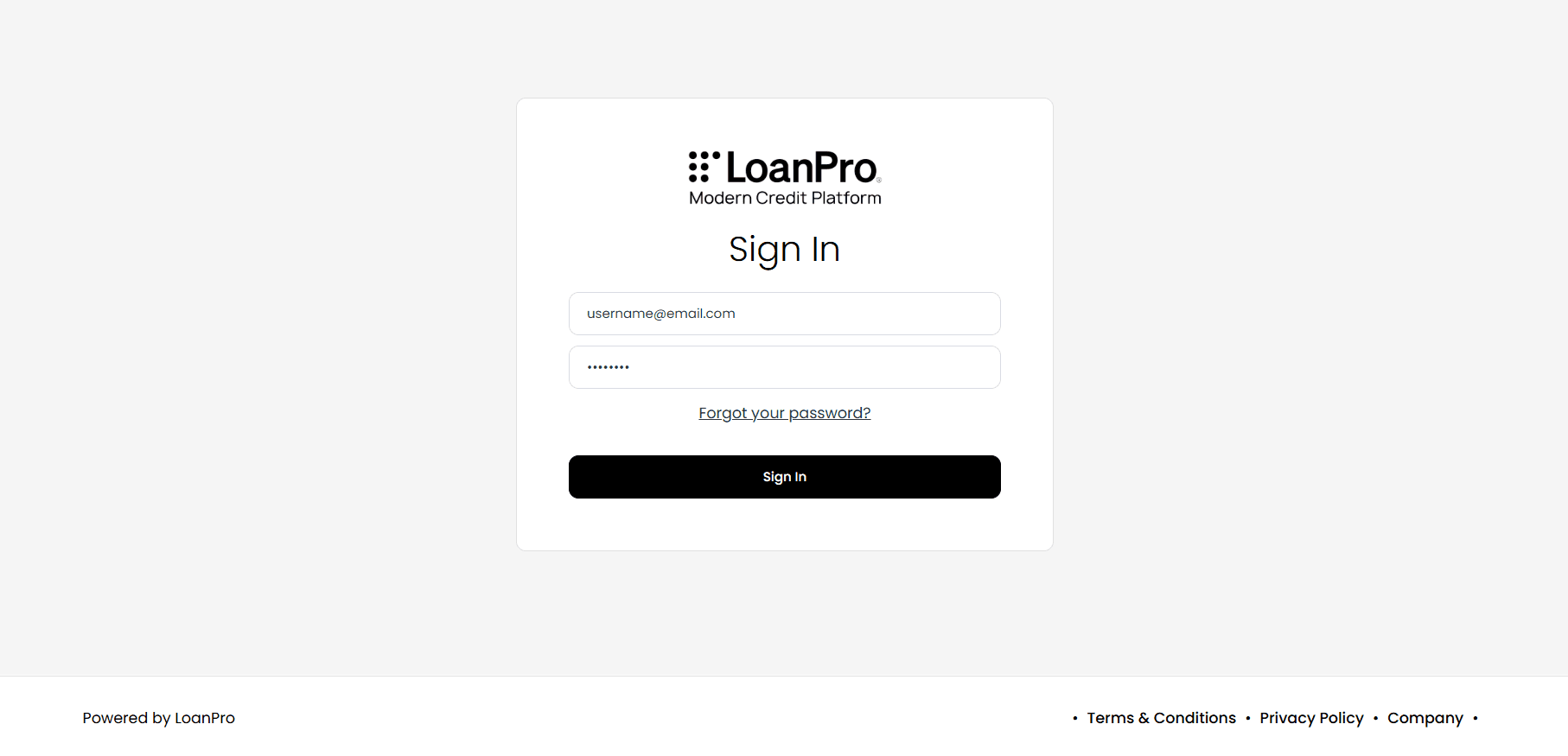
You can manage and update these specific footer URLs directly within LoanPro by navigating to LMS Settings > Website > Page Settings.
How can I test it?
Once your changes have been saved, navigate to your portal's custom login URL (e.g., yourcompany.webaccessportal.com). Scroll to the bottom of the page to view the new split-footer layout and click on each utility link to ensure they direct users to the correct compliance and support pages.